[Zephyr] 在zephyr中使用mcuboot
简介
之前的文章介绍过如何在hpm_sdk中使用mcuboot作为芯片的bootloader程序。文章链接如下:
mcuboot在hpm_sdk中的应用
本文介绍一下如何在zephyr中使用mcuboot作为bootloader,启动app和升级app的过程。
准备工作
首先参考Zephyr SDK Glue的使用说明,将工作环境搭建好。链接如下:
Zephyr SDK Glue使用说明
准备好环境后,可以看到如下几个目录

mcuboot构建
mcuboot需要根据开发板的设备树dts文件中的flash分区信息去获取固件的信息。在设备树信息更新后,mcuboot都需要重新进行编译。
执行以下命令可以构建mcuboot
mkdir build/mcuboot
cd build/mcuboot
west build -b hpm6750evk2 ../../bootloader/mcuboot/boot/zephyr
上述命令可以构建出默认配置下的mcuboot,其中默认配置为
- 未启用软件降级保护
- 使用scratch分区进行升级
如果想更改mcuboot的配置,可以执行以下命令west build -b hpm6750evk2 ../../bootloader/mcuboot/boot/zephyr -t menuconfig构建好mcuboot后,可以使用以下命令将bootloader烧写到开发板中
west flash构建使用mcuboot启动的zephyr app
在mcuboot中提供了一个hello-world例程,用来生成使用mcuboot启动的app,目录为bootloader/mcuboot/samples/zephyr/hello-world
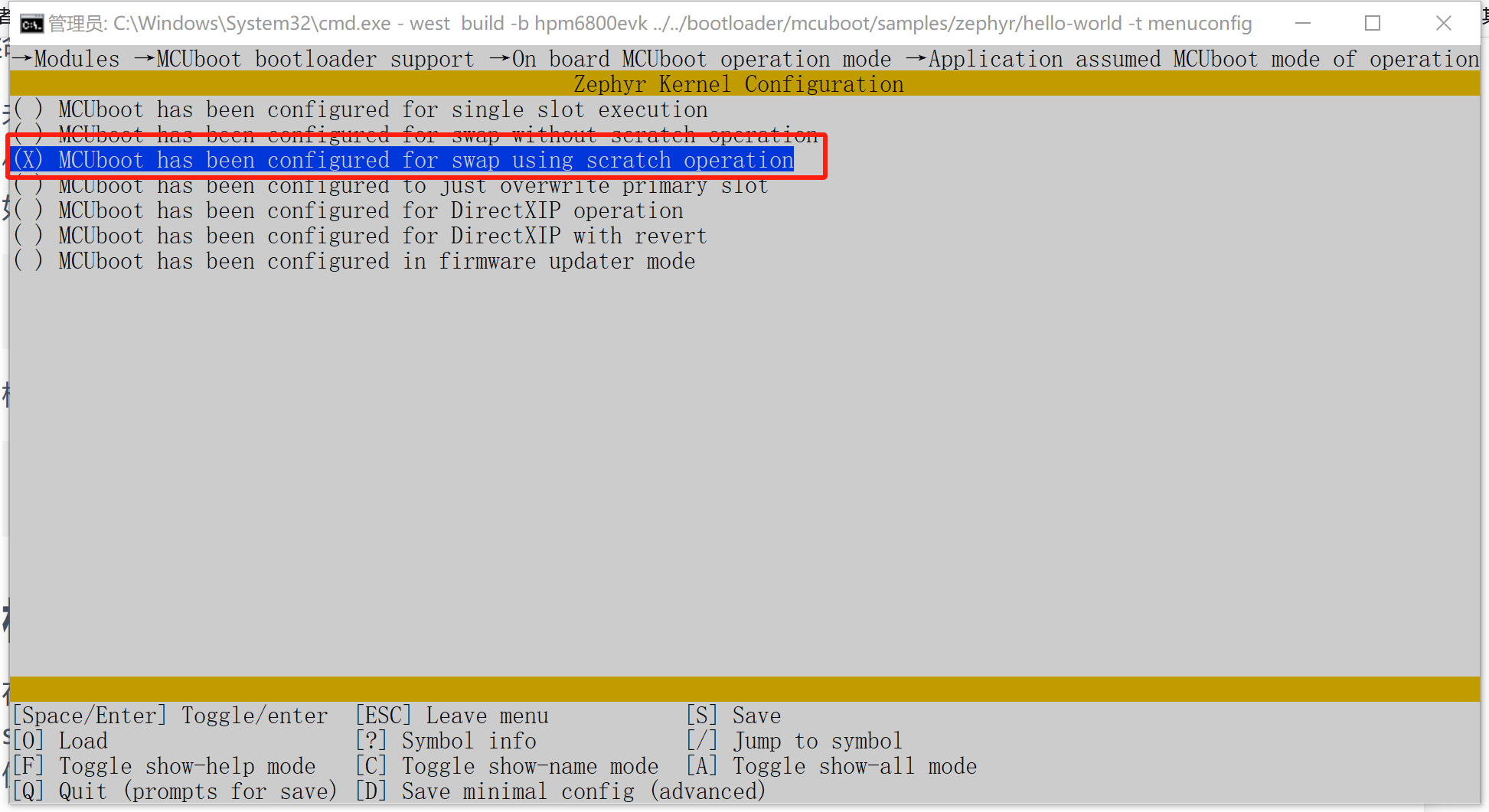
使用以下命令生成相应程序mkdir build/build_hello cd build/build_hello west build -b hpm6750evk2 ../../bootloader/mcuboot/samples/zephyr/hello-world -t menuconfig执行后在图形界面中更改mcuboot相关配置和mcuboot本身的配置一致。其中mcuboot的交换类型默认为MCUBOOT_BOOTLOADER_MODE_SWAP_WITHOUT_SCRATCH与之前构建的mcuboot不符,需要更改为MCUBOOT_BOOTLOADER_MODE_SWAP_SCRATCH,即:
同时在图形配置界面中,还可以手动填写程序版本号。
之后运行以下命令构建appwest build烧写app
使用mcuboot启动的app不能直接使用west flash命令进行烧写,因为west flash命令烧写的是zephyr/zephyr.signed.hex文件,而我们需要将zephyr/zephyr.signed.confirmed.bin烧写到slot1中。借助HPM Manufacturing Tool可以方便的实现该功能。
将开发板的boot开关从 0 0更改为1 0,按下reset进入boot rom,并连接usb或debug接口。在工具中选择正确的接口,连接开发板。
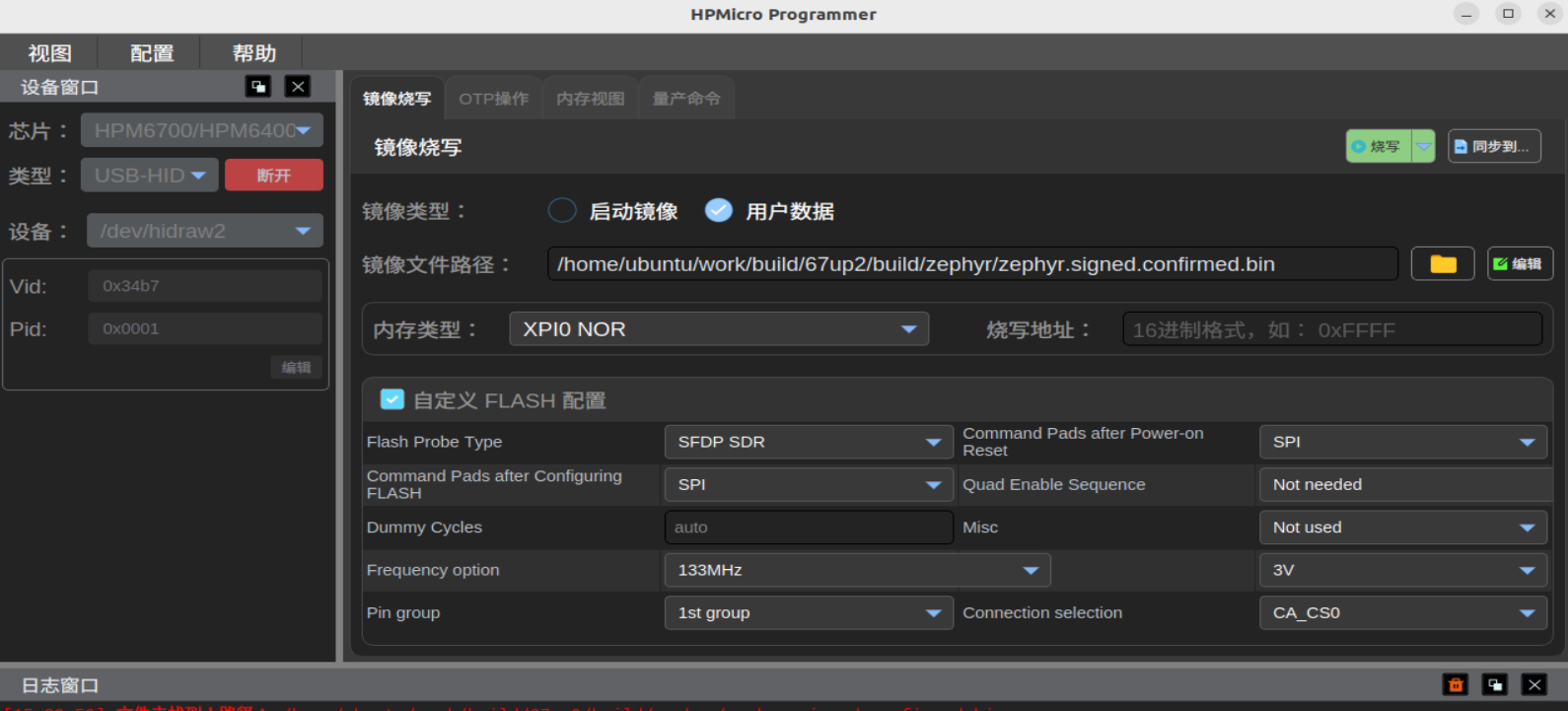
在右侧界面中选择zephyr/zephyr.signed.confirmed.bin文件,在烧写地址一栏填写0x801c3000(根据设备树dts文件计算得来),然后单击烧写按钮进行烧写。
烧写完成后,将boot开关切换回0 0,并重新复位开发板。
终端中应当可以看到mcuboot正确识别了新的app,并执行了升级,升级完成后会自动跳转到app中执行。
*** Booting MCUboot 97699e0df638 ***
*** Using Zephyr OS build zsg_v0.5.0 ***
I: Starting bootloader
I: Primary image: magic=unset, swap_type=0x1, copy_done=0x3, image_ok=0x3
I: Scratch: magic=unset, swap_type=0x1, copy_done=0x3, image_ok=0x3
I: Boot source: primary slot
I: Image index: 0, Swap type: perm
I: Starting swap using scratch algorithm.
I: Bootloader chainload address offset: 0x43000
I: Jumping to the first image slot
*** Booting Zephyr OS build zsg_v0.5.0 ***
Hello World from Zephyr on hpm6750evk2!
zephyr app如何使用mcuboot进行启动
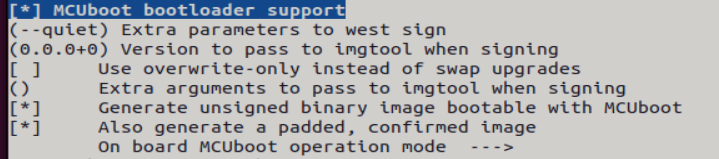
对于直接启动的zephyr app来说,配置为使用mcuboot启动是一件很简单的事情,只需要在menuconfig中将BOOTLOADER_MCUBOOT打开,并配置其相关选项与mcuboot本身一致即可
自定义mcuboot flash分区
mcuboot分区信息保存在开发板的flash信息中。对于hpm6750evk2来说,在boards/hpmicro/hpm6750evk2/hpm6750evk2.dts文件中。
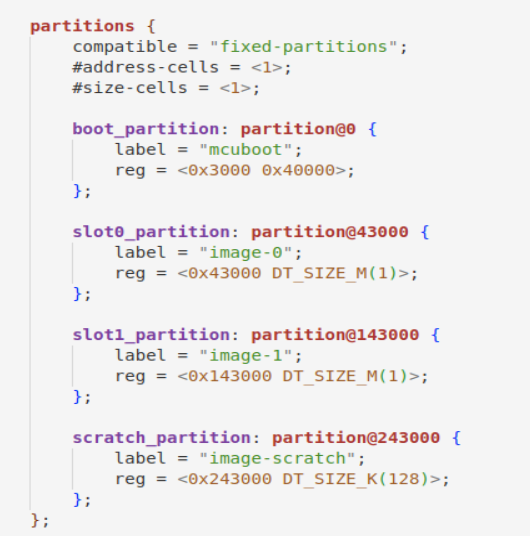
在修改分区信息时,需要注意flash的最小擦除单位,每个分区的起始地址必须和最小擦除单位对齐。在不使用scratch分区时,可以为其添加disable属性。